In today’s digital age, our smartphones have become an extension of ourselves. We rarely leave the house without them. However, many of us still carry the anxiety of accidentally leaving our physical Driving License (DL) at home or, worse, losing it altogether. Being caught by traffic police without your license usually means facing hefty fines and unnecessary stress.
But here is some great news: you no longer need to panic if you forget your physical card. The Government of India allows you to download an authentic, legally valid digital copy of your Driving License directly onto your mobile phone. As per the IT Act, this digital version holds the exact same legal validity as your original physical card.
Here are the two simplest and most reliable methods to download your DL on your smartphone.
Method 1: Via the DigiLocker App (The Easiest & Most Secure Way)
- Step 1: Download and Log InDownload the DigiLocker app from the Google Play Store or Apple App Store. Alternatively, you can visit the official website at
digilocker.gov.in. - Step 2: Sign In / Create an AccountLog in using your Aadhaar number and the registered mobile number. If you are a new user, click on ‘Sign Up’ and create an account by verifying your mobile number via OTP.
- Step 3: Search for Driving LicenseOnce logged in, go to the ‘Search’ tab on the home screen. Type “Driving License” in the search bar.
- Step 4: Select the Issuing AuthorityFrom the search results, select ‘Ministry of Road Transport and Highways’ (or select your specific state transport department, like Karnataka Transport Department).
- Step 5: Enter Your DetailsYour name and date of birth will be pre-filled from your Aadhaar data. Enter your Driving License Number exactly as it appears on your card (e.g., KA012023000XXXX).
- Step 6: Fetch Your DocumentClick on the ‘Get Document’ button. Your digital driving license will be fetched instantly and saved under the ‘Issued Documents’ section. You can now view and show this to traffic police even when you are offline without an internet connection.
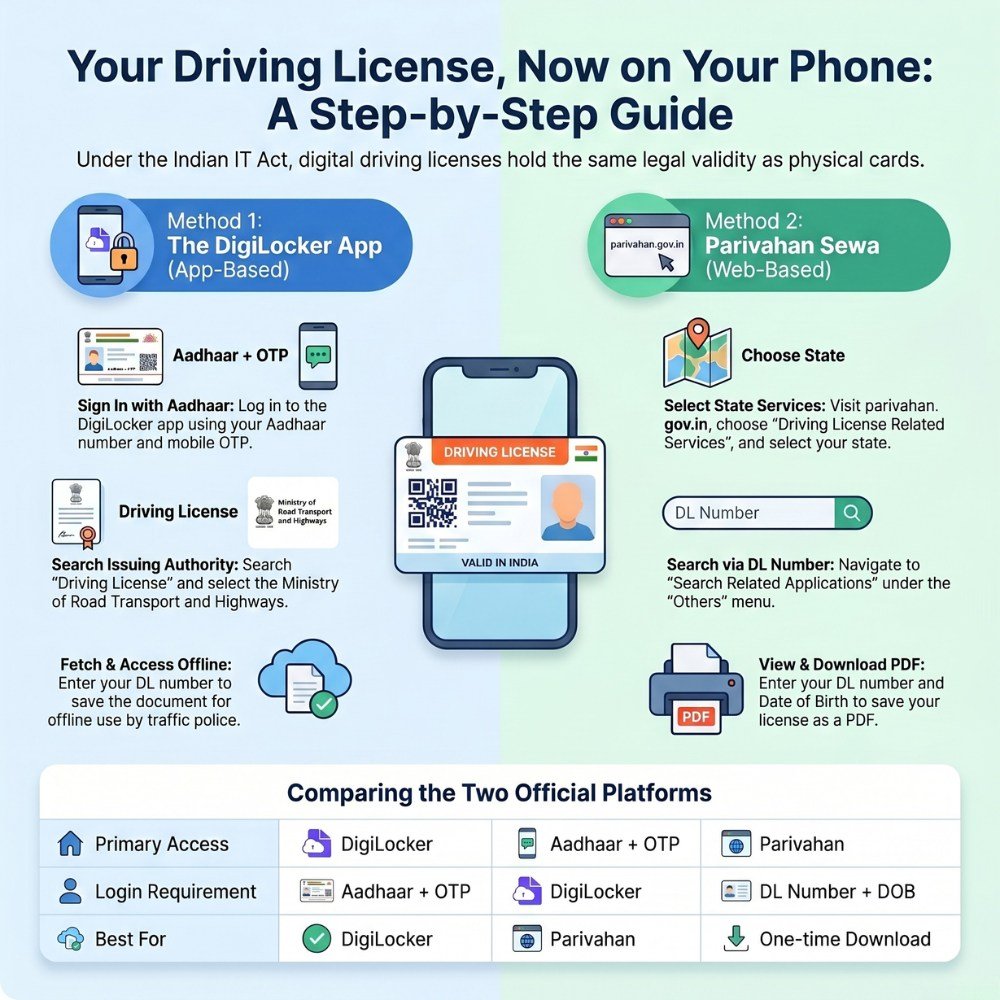
Method 2: Via the Official Parivahan Sewa Website
- Step 1: Visit the PortalOpen your mobile browser and go to the official website:
parivahan.gov.in. - Step 2: Navigate to DL ServicesOn the homepage, look for the ‘Online Services’ menu and select ‘Driving License Related Services’.
- Step 3: Choose Your StateYou will be redirected to a new page. Select your state (e.g., Karnataka) from the drop-down menu.
- Step 4: Search Your ApplicationOn the main dashboard of your state page, click on the ‘Others’ menu located in the top navigation bar and select ‘Search Related Applications’.
- Step 5: Enter CredentialsSelect ‘DL Number’ from the search criteria, enter your unique Driving License number, and provide your Date of Birth (DOB). Click on the ‘Submit’ button.
- Step 6: View and DownloadYour complete license details will appear on the screen. Click on the ‘Print DL’ button or tap on your photo to save the document as a PDF on your smartphone.
Key Points to Keep in Mind
- Legal Validity: Under the Information Technology Act, 2000, and the Central Motor Vehicles Rules, digital documents presented through authorized apps like DigiLocker or mParivahan are 100% legally valid. Traffic police cannot refuse to accept them.
- Correct Format: When entering your DL number, make sure not to leave any accidental spaces or special characters unless specified by your state’s format.
- Offline Access: Once downloaded onto the DigiLocker app, the document is saved locally on your phone. You can present it to authorities even in remote areas with zero network connectivity.
By spending just five minutes setting this up today, you can save yourself from future fines and drive with complete peace of mind!
Important Links
| Link Description | Action Link |
| Join WhatsApp Group | Click Here to Join |
| Join Telegram Group | Click Here to Join |
| Apply Online Portal | Click Here / Click Here |