In Karnataka, a Ration Card is far more than just a tool to procure subsidized food grains like rice, wheat, and sugar. It serves as a foundational legal identity and address proof, acting as a mandatory gateway to access various state and central government welfare schemes—including free healthcare, housing benefits, and educational scholarships.
If you have been waiting to apply for a fresh ration card, the Department of Food, Civil Supplies, and Consumer Affairs has streamlined the process online. Here is an exhaustive, step-by-step guide on eligibility, required documentation, and the application process.
Who is Eligible to Apply?
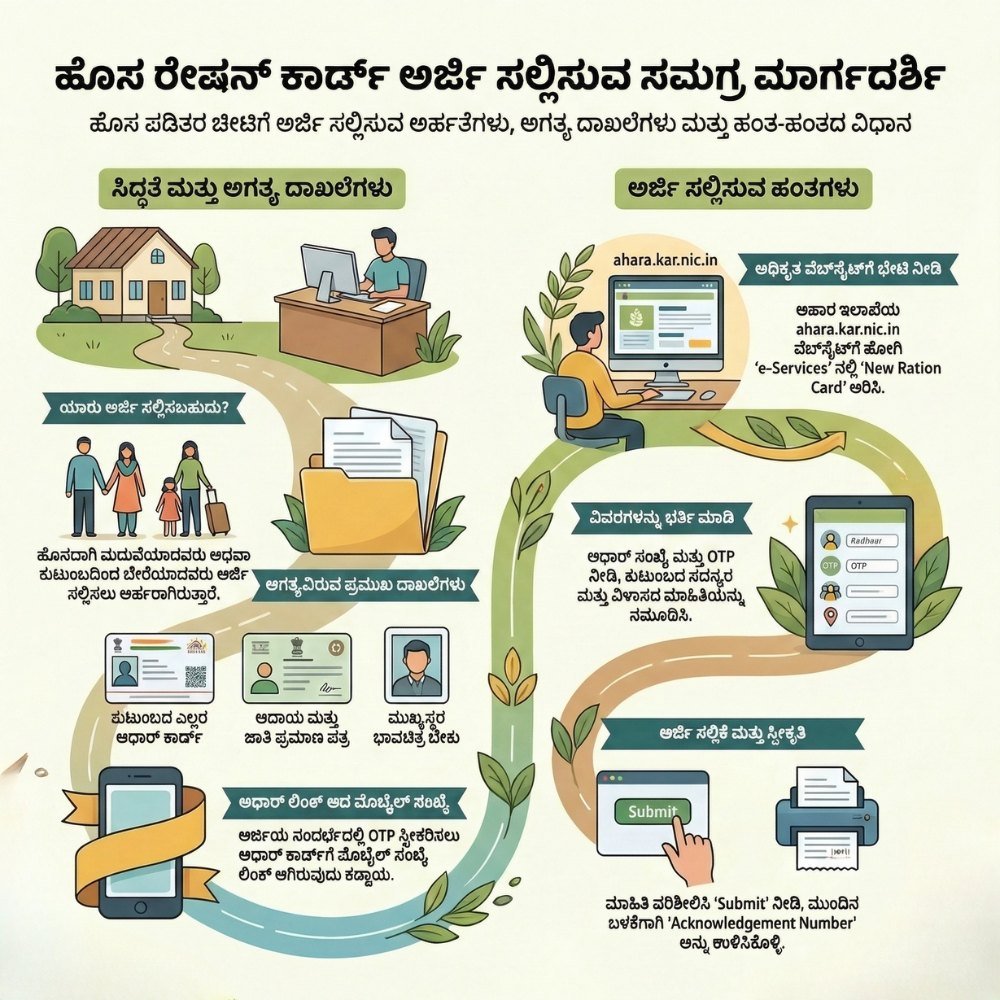
The government allows specific categories of residents to apply for a new ration card to ensure that benefits reach the rightful beneficiaries without duplication. You can apply if you fall under any of the following categories:
- Newly Married Couples: Newlyweds who need to establish a new household separate from their parents can apply by removing their names from their respective parents’ cards and creating a new joint card.
- Household Separation: Individuals or split families who have legally or functionally separated from their joint families and are now running an independent kitchen.
- First-Time Applicants: Any permanent resident of Karnataka who has never held a ration card before or does not have their name included in any existing ration card across India.
Mandatory Documents and Prerequisites
Before sitting down to fill out the online application, ensure you have scanned copies and physical access to the following documents. Missing or invalid details can lead to immediate rejection.
1. Aadhaar Card (Mandatory for All)
Every single family member whose name is to be included in the new ration card must possess a valid Aadhaar Card. The names and biometric data must be updated and accurate.
2. Income and Caste Certificate
You must possess a valid, government-issued Income and Caste Certificate. Ensure that the certificate is recent and has not expired, as the financial data provided here determines whether you qualify for a BPL or an APL card.
3. Aadhaar-Linked Mobile Number
An active mobile number linked directly to the head of the family’s Aadhaar card (as well as other adult members) is non-negotiable. The entire verification process relies heavily on One-Time Passwords (OTPs) sent by the UIDAI systems.
4. Passport Size Photograph
A recent passport-size photograph of the Head of the Family (HoF). In Karnataka, the government prioritizes making the senior-most female member the head of the household to promote women’s empowerment.
Step-by-Step Online Application Process
The application process has been digitized to eliminate middlemen and promote transparency. Follow these explicit steps to submit your application via the official portal:
Step 1: Visit the Official Portal
Open your web browser and navigate to the official website of the Food, Civil Supplies, and Consumer Affairs Department of Karnataka: ahara.kar.nic.in.
Step 2: Navigate to e-Services
On the website’s homepage, look at the main menu bar and click on the ‘e-Services’ (ಇ-ಸೇವೆಗಳು) tab. This will redirect you to a portal dedicated to public electronic services.
Step 3: Choose ‘New Ration Card’
Within the e-Services dashboard, navigate to the “Ration Card” section and select the link that says ‘New Ration Card’ (ಹೊಸ ಪಡಿತರ ಚೀಟಿ). You will be prompted to select your language preference (Kannada or English).
Step 4: Select the Type of Card
You must choose the card type based on your socio-economic status:
- Priority House Hold (PHH / BPL): For families falling below the poverty line, requiring subsidized food and extensive government aid.
- Non-Priority House Hold (NPHH / APL): For families above the poverty line who primarily require the card as an identification and address document.
Step 5: Aadhaar Authentication & Data Entry
Enter the Aadhaar number of the head of the family. An OTP will be sent to the registered mobile number. Enter the OTP to verify your identity. Once verified, the system will automatically fetch basic details from the Aadhaar database.
Proceed to add other family members by entering their Aadhaar numbers and authenticating them via separate OTPs. Carefully fill in your current residential address, ward/village details, and annual income statistics.
Step 6: Document Upload and Submission
Upload the digital copies of the Income Certificate and the photograph of the household head. Double-check all entered information, ensuring names match the Aadhaar cards exactly. Click on the ‘Submit’ button.
Important Note: Upon successful submission, the system will generate a unique Acknowledgement Number. Print this out or save it digitally. You will need this number to track your application status and download the e-Ration card once approved.
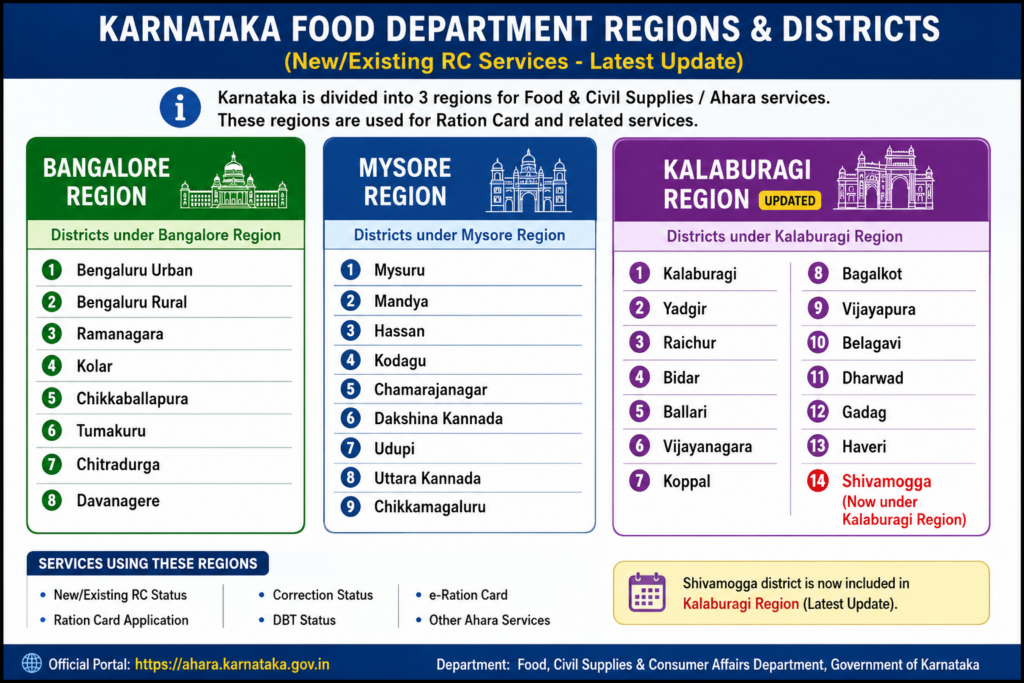
Apply Links for New Ration Card:
| Bengaluru Division | Click Here |
| Mysuru Division | Click Here |
| Kalaburagi Division | Click Here |
“Karnataka Food Department Division Lists”
Post-Submission Verification
Once submitted, your application undergoes a multi-tier verification process:
Approval and Download: Once the verification report is positive, your card is approved. You can download the digital e-Ration Card directly from the same portal, which holds the same legal validity as a physical printed card.
Local Inspection: A local Food Inspector or Village Accountant may visit your registered address to verify the living conditions and family details.
Important Links
| Link Description | Action Link |
| Join WhatsApp Group | Click Here to Join |
| Join Telegram Group | Click Here to Join |
| Apply Online Portal | Click Here |
| Official Website | Click Here |